Geometry, shapes and collision checking
We first have to get some administration out of the way.
[1]:
# point to source, not to installed version
import sys
import os
abs_path = os.path.abspath(os.path.join(os.getcwd(), '../..'))
sys.path.insert(0, abs_path)
del abs_path

# show the plot below the corresponding codeblock
%matplotlib inline

# import the stuff we use on this page
import numpy as np
import matplotlib.pyplot as plt
from acrobotics.geometry import Shape, Collection
from acrobotics.util import get_default_axes3d
from acrobotics.util import pose_z, plot_reference_frame
Shapes
Shapes are geometric objects to represent robots or other things in the planning environment. You can use them for:
| visualization: | A shape has a plot function to display them as a wireframe in matplotlib axes. |
|---|---|
| collision checking: | |
| A shape has a is_in_collision function to check if they collide with other shapes. | |
| representation: | One can get different aspects of a shape such as the vertices or edges. These are used for plotting but are also useful for optimization algorithms for example. |
In the current version only boxes are implemented.
Shape position and orientation
A shape has no inherent position! To get something useful from a shape, you have to supply the position and orientation (in one word, the pose). The pose of a shape is expected as a homogeneous transform matrix. For example, if I want all the edges of a box of 1x2x2, with the box at the origin, I do:
[2]:
box = Shape(1, 2, 2)
tf_identity = np.eye(4)
print(box.get_vertices(tf_identity))
[[-0.5  1.   1. ]
 [-0.5  1.  -1. ]
 [-0.5 -1.   1. ]
 [-0.5 -1.  -1. ]
 [ 0.5  1.   1. ]
 [ 0.5  1.  -1. ]
 [ 0.5 -1.   1. ]
 [ 0.5 -1.  -1. ]]
If I want the edges of the same box in a different position I give it a different transform.
[3]:
tf = np.eye(4)
tf[2, 3] = 0.6

print(box.get_vertices(tf))
[[-0.5  1.   1.6]
 [-0.5  1.  -0.4]
 [-0.5 -1.   1.6]
 [-0.5 -1.  -0.4]
 [ 0.5  1.   1.6]
 [ 0.5  1.  -0.4]
 [ 0.5 -1.   1.6]
 [ 0.5 -1.  -0.4]]
See, the box moved! All other task handle shapes with this basic API.
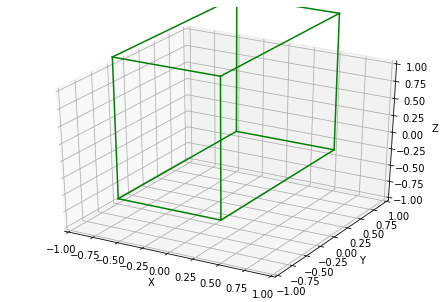
We can have a look at the shape. The module acrobotics.util has a convenience fucntion to get 3d compatible matplotlib axes. Notice that we have to specify where to plot the box, a shape has no inherent position.
[4]:
import matplotlib.pyplot as plt

fig, ax = get_default_axes3d()
box.plot(ax, tf, c='green')
Collection of shapes
Most objects are more complicated that just a box. Somethimes it is useful to associate a transform with a shape. The two points are addressed by Collections. They group a list of shapes with a list of transforms. pose_z(angle, x, y, z) is a convenience function from acrobotics.util to create a transform of a translation followd by rotation around the z-axis.
[7]:
box1, tf1 = Shape(1, 1, 1), np.eye(4)
box2, tf2 = Shape(0.5, 0.5, 0.5), pose_z(0, 0, 0, 0.75)

happy_family = Collection([box1, box2], [tf1, tf2])

fig, ax = get_default_axes3d()
happy_family.plot(ax, c='blue')
plot_reference_frame(ax)
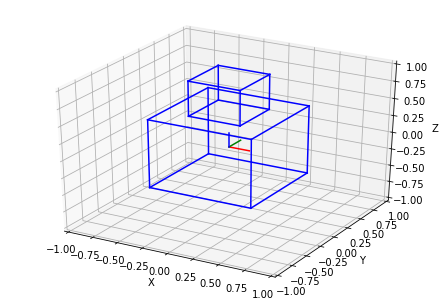
Notice how the defaul pose of a shape is centered around the origin. We plot a default reference frame (identity transform) with plot_reference_frame from acrobotics.util.
[ ]: